Enabling Parallel Tracking in Google Ads:
To ensure seamless integration with Webgains, follow these steps:
-
Sign in to your Google Ads account.
-
Navigate to All Campaigns > Ads.
-
Click on the Ad ‘edit’ icon.
-
In the Final URL field, enter the landing page for the Ad with the following parameters:
gclid={gclid}&wgc=$campaignID&wgp=$programID
(Replace$programIDwith the required program ID and$campaignIDwith your campaign ID.)-
Final URL example:
https://www.domain.com/?utm_source=webgains&gclid={gclid}&wgc=$campaignID&wgp=$programID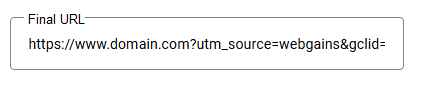
-
-
In the Tracking Template field, enter your Webgains Tracking Link and add the following parameters:
gclid={gclid}&wgtarget={lpurl}-
Please note that the value set in the “wgtarget” parameter must be the same page URL set in the Final URL (without any additional parameter such as wgp, wgc, utms, etc.)
-
The tracking template should be like:
https://assets.ikhnaie.link/click.html?wgcampaignid=$campaignID&wgprogramid=$programID&gclid={gclid}&wgtarget={lpurl}
-
-
Click Save.
Where to find your Webgains Tracking URL:
-
The Program ID will be specific to the advertiser program you are working with, and can be found on your Programs list in the Webgains platform, or within the Deeplink Generator.
-
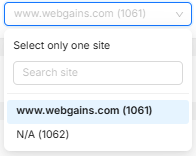
Your Campaign ID (also known as Site ID) is unique to your Site that has joined the programs, and will be pre-populated into the Deeplink Generator, or can be found in the dropdown at the top of your platform view:
Important Notes:
-
The wgp and wgc parameters are mandatory.
-
Any required UTM parameters (e.g.,
utm_source=Webgains&utm_campaign=^^^siteid^^^) should be included in the Final URL to facilitate proper attribution in external analytics platforms.
Landing Page Considerations:
Since Parallel Tracking loads the final URL directly from Google Ads, it is no longer possible to modify landing page parameters during the redirect process. Any required tracking parameters must be explicitly set in the Final URL field.
This approach ensures that Webgains can continue tracking affiliate-driven traffic effectively while adhering to Google’s Parallel Tracking framework.