
What is a Cookie?
Cookies are small text files that are transferred to the visitor's device when clicking on an advert. User-specific information is saved in cookies. If the customer orders a product in the following (period) days, the purchase will be shown in our publisher system and the related commission is paid after your confirmation.
Read more about: What is the Webgains cookie?
What is a Cookie Period?
The lifespan of the cookie. Once the cookie period expires, it will no longer be available to Webgains attribution process and thus not able to track.
Webgains cookie period can be configured within the advertiser’s program settings.
Managing your Cookie Period
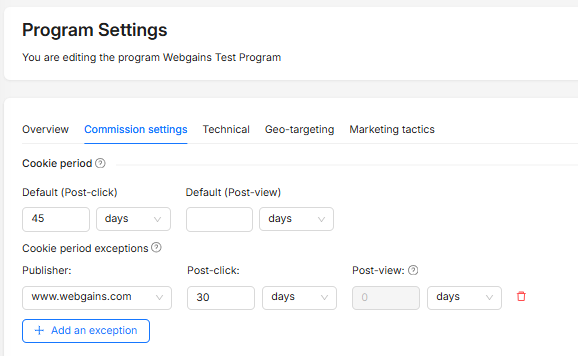
To manage your cookie period, go to your Program Settings > Commission settings.
Here, you can define your default cookie period (that is, the period that will apply to all publishers on the program). You can also set ‘exceptions', enabling you to set a different cookie period for a specific publisher, if necessary.
Why Cookie Duration Matters: A longer cookie duration increases the chances of the publisher getting credited for a sale, even if the customer doesn't buy immediately after clicking the link.
Please note that as per point 2.4 of advertiser contractual T&Cs, a merchant is not permitted to reduce their program cookie period by more than 20% within a 30-day period.