
Publisher application approvals control how new publishers are approved to join your program. You can choose between manual review of each application or automatic approval of all applications that are submitted.
The approval setting is managed in your account under Program Settings. You can configure it to either Manual or Automatic:
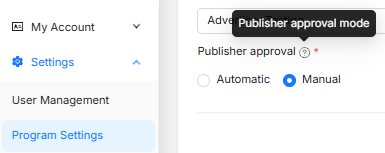
Manual approvals
When the approval setting is Manual:
-
Each new publisher application appears in your Publisher Management - Pending tab for review.
-
You must explicitly approve or reject each application before the publisher can join.
-
This option gives you more control over who joins your program.
Automatic approvals
When the approval setting is Automatic:
-
All new publisher applications are approved as soon as they are submitted.
-
Publishers can start working in your program without any manual review.
-
This option reduces administrative work but provides less control over who joins.
Learn more about Publisher Management