
What is a Validation Period?
Formerly: Recall Period
A Validation Period is the amount of time between when a transaction is created on Webgains (when a sale is tracked), to when it will become “Confirmed” (or, “Approved”) and ready for invoicing.
After a Validation Period expires, it can no longer be cancelled or adjusted.
Validation Periods are 30 days by default (although this can be higher if discussed and agreed with Webgains), which aligns with a standard returns-window that many businesses operate by, and so allowing sufficient time for a customer to return their order and the Webgains transaction to be adjusted accordingly.
A shorter Validation Period (or, the quicker Approval of transactions) will be more attractive to publishers who are joining a program, as it means transactions will be confirmed sooner and commission payout will be quicker.
Learn more: What is a Validation Policy?
If your program was set up prior to 2026, your Recall Period will have been set within your Event Commission (under Commission Management). This has now moved to Program Settings, however any existing Recall Period settings under Event Commissions will remain valid, unless overwritten in the new Settings area.
Adjusting your Validation Period
Commission Settings page new for 2026
To adjust your Validation period, go to your Program Settings > Commission settings.
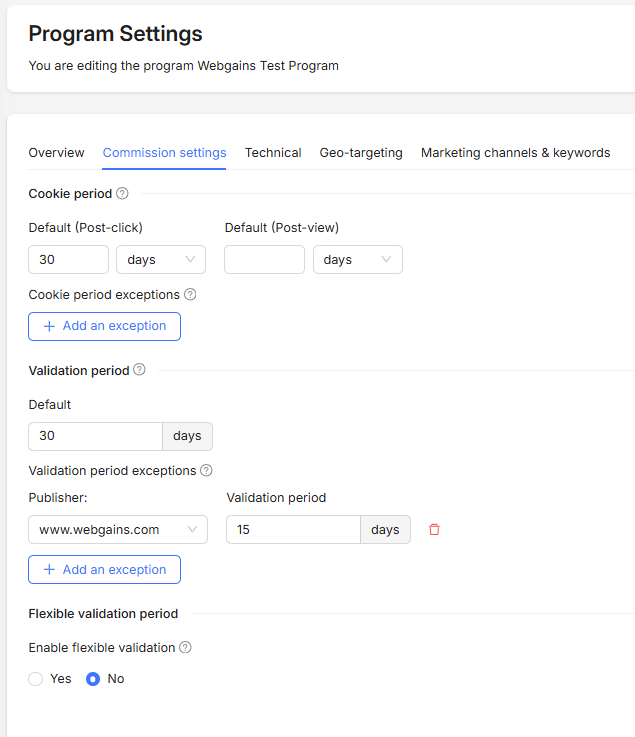
Validation Period - Publisher Exceptions
If a specific publisher requires a different Validation period, this can be done by adding an ‘exception’. Select the publisher, and specify the number of days their Validation period should be.
Flexible Validation Periods
Advertisers are able to set a Flexible Validation Period, which means transactions will remain in an Unconfirmed status until the ‘Lock Date’ is reached. The Lock Date must be sent to Webgains within the tracking script.
This flexible validation period functionality means the validation of transactions can be accurately managed and automated. This flexible Lock Date functionality allows for accurate, automated validation of transactions based on real-world events specific to your business.
For instructions on how to set this up within the tracking and in the program, please view: Flexible Validation Periods and speak to your Webgains Account Manager.