
The Transaction Management tool for Webgains advertisers enables the swift approvals and cancellations of multiple transactions simultaneously, saving you time when managing your program's activity.
How To Confirm/Cancel Transactions:
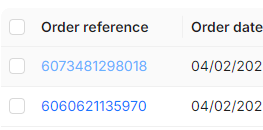
Transaction Management allows you to select via checkbox exactly which transactions you would like to update, and an action option to make a status change.
If you need to view more information about the transaction, you can click the Order Reference which will expand the full transaction details from within the Transaction Report:
How To Adjust (edit) Transactions:
High-Level Workflow:
-
Download the Transaction Item Report CSV which shows the item-level information for transactions.
-
In the file, make item-level changes like cancelling items or adjusting sales values.
-
When you're done, upload the file to apply the updates.
-
Check back in the platform Upload History to see if the file has been processed successfully and correct any errors if necessary.
For full guidance on bulk item adjustments, please view: Transaction Item Adjustment for Bulk Management