
Within our Smart Commissions tool is the option to apply commission to Product Types (or, advertiser supplied categories). This can work by ‘grouping’ the products to a type in your feed.
This value will come from the Product Feed uploaded within your advertiser program, for products in the product_type column.
This Product Types option allows advertisers the flexibility to set custom defined product type groups, as an alternative to Product Category commission.
The Product Types will rely on Product Level Tracking, as well as a functional Product Feed uploaded within your advertiser program, as we will identify the product Type from the feed’s product_type column.
This product data will need to be included in the Product Feed supplied to Webgains as a custom column with the header product_type.
The product_type field is a repeatable field, meaning that you can use the column more than once in a feed if necessary.
E.g. you may want to use this column once to define the product type, and again to define a custom product commission group (such as ‘Commission-X-Group’). The field just needs to be kept up-to-date in the feed so the items are correctly categorised.
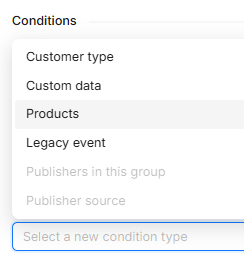
When creating your Smart Commission scheme and selecting the Conditions, click Products:
Then, select the desired Product Types within the dropdown (results generated as per the product feed):
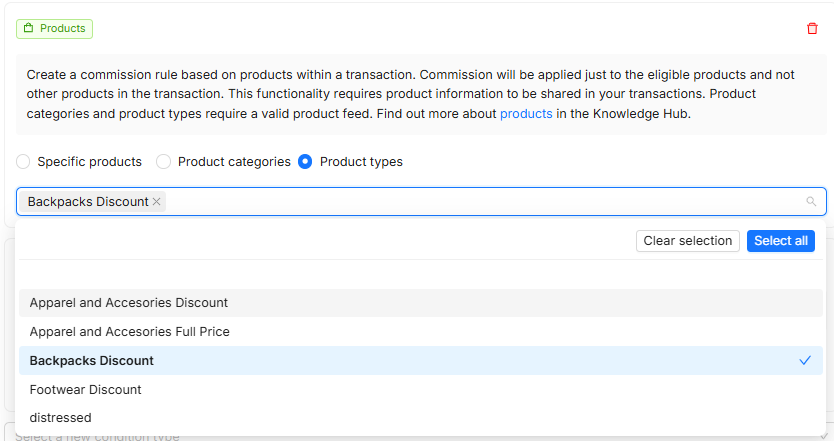
Any products that track within a transaction matching this Type and adhering to any other rules applied to the commission scheme, according to priority order) will apply this Commission.
Please speak to your account manager if you are unsure about your product level tracking, as this is crucial for the commission to apply, as it will match the tracked ItemID to what rules are set up in your commission scheme.