The Webgains Smart Commissions tool has been developed to ensure the creation and management of Smart Commissions can be done as simply and swiftly as possible, all in one place.
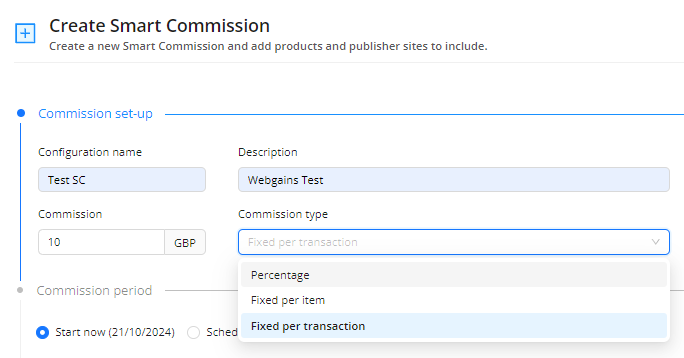
The Smart Commissions feature allows commission schemes as either Percentage or Fixed commissions to be scheduled for multiple periods.
The scheme is able to match a range of criteria, such as:
The commission rules can be used individually or as a combination, allowing for cascading rules with priority for each level, allowing for a new level of flexibility when creating commissions.
Smart Commissions offers a clear view and management of all commissions set-up, whether Active, Scheduled, Draft or Expired in one easy-to-use interface, with filtering available to refine the results displayed in the table.
How does it work?
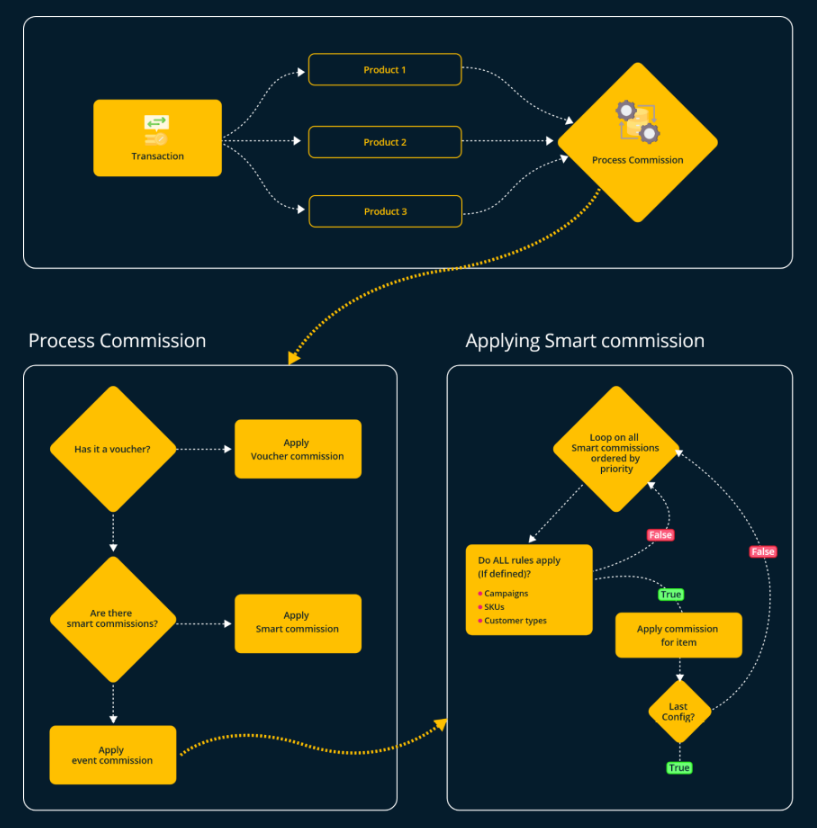
When the system registers a transaction, the following steps will occur:
-
If a voucher is applied to a transaction, and the program has voucher commission setup for this voucher, then voucher commission will apply (taking #1 commission priority).
-
For every item in the transaction, the system will try and match this to every active Smart Commission, in according to their order.
-
If the rules defined in the Smart Commission match the item in the transaction, for example the product included match or the sites included match, then the Smart Commission will be applied to that item.
-
If no Smart Commission rules have been matched to the transaction item, then Default commissions will then apply.
It is very important to note that the system will be applying the commissions on a line items basis, meaning it will check per item, not per transaction.
The Tracking Flow:
-
The system first checks for voucher commission, and applies if the conditions are met.
-
It then checks each tracked Item within the transaction, and if this matches any active Smart Commission schemes. This includes commissions with rules on item IDs, product categories, publisher Sites (Commission Groups)
-
If multiple Smart Commission rules apply to an item, the highest priority schemes will be checked first.
-
-
If there are no scheme rules that match the tracked item/transaction, then the Default commission applies for any remaining items.